I’m working on some tools for manipulating panorama images and as a first step, I made a simple python script for viewing the images. I’m sharing it here for anyone who might find it useful to have a working implementation to reference.
It’s set up as a uv script, so you can run it with uv run script.py image.jpg where script.py is the file containing this code.
A few things I’m not quite happy with at the moment:
- The mouse control mapping function is wrong, but it works well enough to be usable.
- The script needs better clarity and consistency in variable naming when converting between any of the five different coordinate systems.
spoiler
# /// script
# dependencies = [
#   "numpy",
#   "pillow",
#   "pygame",
# ]
# ///

# Convention:
#   From the perspective of a viewer looking through the viewport...
#   In 2D, the x-axis points to the right, and the y-axis points up.
#   In 3D, we just extend this.
#       The x-axis points to the right, the y-axis points up, and the z-axis points forward into the screen.
#   When yaw = pitch = roll = 0, we are looking forward at the point (x,y,z) = (0,0,1) on the unit sphere
#   We use the right hand rule for rotation direction. With the right thumb pointing in the direction of the axis, then a positive rotation around that axis (i.e. a rotation that increases the angle) follows the direction of the fingers' curl.


from collections import defaultdict
import itertools
from pathlib import Path
import sys

import numpy as np
from PIL import Image
import pygame


def ypr_to_rotation_matrix(yaw, pitch, roll):
    # Create the rotation matrices
    # See https://en.wikipedia.org/wiki/Rotation_matrix#General_3D_rotations

    rotation_matrix_yaw = np.array([
        [np.cos(yaw), 0, -np.sin(yaw)],
        [0,           1, 0          ],
        [np.sin(yaw), 0, np.cos(yaw)]
    ])
    rotation_matrix_pitch = np.array([
        [1, 0,             0            ],
        [0, np.cos(pitch), -np.sin(pitch)],
        [0, np.sin(pitch), np.cos(pitch) ]
    ])
    rotation_matrix_roll = np.array([
        [np.cos(roll), -np.sin(roll), 0],
        [np.sin(roll), np.cos(roll),  0],
        [0,            0,             1]
    ])

    rotation_matrix = rotation_matrix_yaw @ rotation_matrix_pitch @ rotation_matrix_roll

    return rotation_matrix


def equirectangular_to_rectilinear_image(img: Image.Image, size: tuple[int,int], viewport_dist: float, yaw, pitch, roll) -> Image.Image:
    """
    Args:
        img: Input equirectangular image.
        size: Output image size (width, height) in pixels.
        viewport_dist: The distance between the viewport plane and the viewer. Assume the input image is on a unit sphere.
    """

    output_mesh = np.meshgrid(np.arange(size[0]), np.arange(size[1]))
    output_x = output_mesh[0].flatten()
    output_y = output_mesh[1].flatten()

    # Compute the point on the viewport plane in 3D space
    output_3d_x = (output_x - size[0] // 2) / size[0]
    #output_3d_y = (output_y - size[1] // 2) / size[1]
    output_3d_y = (output_y - size[1] // 2) / size[0]
    output_3d_z = np.full_like(output_3d_x, viewport_dist)

    # Normalize to put them on the unit sphere
    norm = np.sqrt(output_3d_x ** 2 + output_3d_y ** 2 + output_3d_z ** 2)
    unit_x = output_3d_x / norm
    unit_y = output_3d_y / norm
    unit_z = output_3d_z / norm

    # Rotate the unit sphere coordinates based on the yaw/pitch/roll angles
    rotation_matrix = ypr_to_rotation_matrix(yaw, pitch, roll)
    rotated_coords = rotation_matrix @ np.vstack((unit_x, unit_y, unit_z))

    # Convert back to lat/long coordinates
    rotated_x, rotated_y, rotated_z = rotated_coords
    latitude_1  = np.arcsin(rotated_y)
    longitude_1 = np.arctan2(rotated_x, rotated_z)

    # Convert to pixel coordinates in the equirectangular image
    equirectangular_x = (longitude_1 / (2 * np.pi) * img.width).astype(int) % img.width
    equirectangular_y = ((latitude_1 + np.pi / 2) / np.pi * img.height).astype(int) % img.height

    # Sample the equirectangular image to create the rectilinear image
    rectilinear_image = np.array(img)[equirectangular_y, equirectangular_x]

    return Image.fromarray(rectilinear_image.reshape(size[1], size[0], -1))


def map_mouse_drag(mouse_coord_start: tuple[int,int], mouse_coord_end: tuple[int,int], viewport_size: tuple[int,int], viewport_dist: float) -> tuple[float,float,float]:
    """
    Given a mouse click and drag event, compute the corresponding change in rotation.

    Args:
        mouse_coord_start: Mousedown coordinates on the image. Top-left corner is (0,0), bottom-right corner is `viewport_size`.
        mouse_coord_end: Coordinate of the cursor after the click and drag. Follows the same convention as `mouse_coord_start`.
        viewport_size: (width, height) of the viewport in pixels.
        viewport_dist: Distance between the viewer and the viewport. A distance of 1 means the viewport is tangent to the unit sphere on which the image lies.
    """

    # Convert to numpy arrays
    size = viewport_size[0]
    np_start = np.array([mouse_coord_start[0]/size, mouse_coord_start[1]/size, viewport_dist])
    np_end = np.array([mouse_coord_end[0]/size, mouse_coord_end[1]/size, viewport_dist])

    # Map mouse coordinates to points in the unit sphere
    unit_start = np_start / np.sqrt((np_start ** 2).sum())
    unit_end   = np_end   / np.sqrt((np_end   ** 2).sum())

    # Project onto the x-y plane
    proj_start = np.array([unit_start[0], 0, unit_start[2]])
    proj_end   = np.array([unit_end[0],   0, unit_end[2]])

    # a x b = |a| |b| sin(theta) n
    # If positive, then the angle is positive going from a to b. Otherwise, it's negative.
    # Compute the y component of proj_start x proj_end
    # (note: all other components are 0)
    cross_product_y = unit_end[2] * unit_start[0] - unit_end[0] * unit_start[2]
    mag_proj_start = np.sqrt((proj_start ** 2).sum())
    mag_proj_end   = np.sqrt((proj_end   ** 2).sum())
    sin_delta_yaw = cross_product_y / (mag_proj_start * mag_proj_end)
    delta_yaw = -np.arcsin(sin_delta_yaw) # sign will match that of `sin_delta_yaw`

    # Project onto the y-z plane
    proj_start = np.array([0, unit_start[1], unit_start[2]])
    proj_end   = np.array([0, unit_end[1],   unit_end[2]])

    # Compute the x component of proj_start x proj_end
    cross_product_x = unit_end[2] * unit_start[1] - unit_end[1] * unit_start[2]
    mag_proj_start = np.sqrt((proj_start ** 2).sum())
    mag_proj_end   = np.sqrt((proj_end   ** 2).sum())
    sin_delta_pitch = cross_product_x / (mag_proj_start * mag_proj_end)
    delta_pitch = -np.arcsin(sin_delta_pitch) # sign will match that of `sin_delta_yaw`

    return (delta_yaw, delta_pitch, 0)


def viewer(image: Image.Image, size: tuple[int, int]):
    yaw = 0
    pitch = 0
    roll = 0
    viewport_dist = 0.5
    delta_yaw = np.pi / 100
    delta_pitch = np.pi / 100
    delta_roll = np.pi / 100

    key_is_down = defaultdict(lambda: False)
    mousedown_coord = None # Relative to the window (i.e. top-left is (0,0))
    mousedown_ypr = None
    mouse_coord = None # Relative to the window
    pygame.init()
    screen = pygame.display.set_mode(size)
    clock = pygame.time.Clock()

    for i in itertools.count():
        # Process player inputs.
        for event in pygame.event.get():
            if event.type == pygame.QUIT:
                pygame.quit()
                raise SystemExit
            elif event.type == pygame.KEYDOWN:
                key_is_down[event.key] = True
            elif event.type == pygame.KEYUP:
                key_is_down[event.key] = False
            elif event.type == pygame.MOUSEMOTION:
                mouse_coord = event.pos
            elif event.type == pygame.MOUSEBUTTONDOWN:
                if event.button == 1:
                    mousedown_coord = event.pos
                    mousedown_ypr = (yaw, pitch, roll)
            elif event.type == pygame.MOUSEBUTTONUP:
                if event.button == 1:
                    mousedown_coord = None
                    mousedown_ypr = None

        # Do logical updates here.
        if mousedown_coord is None:
            if key_is_down[pygame.K_LEFT]:
                yaw += delta_yaw
            if key_is_down[pygame.K_RIGHT]:
                yaw -= delta_yaw
            if key_is_down[pygame.K_UP]:
                pitch += delta_pitch
            if key_is_down[pygame.K_DOWN]:
                pitch -= delta_pitch
            if key_is_down[pygame.K_q]:
                roll -= delta_roll
            if key_is_down[pygame.K_e]:
                roll += delta_roll
        else:
            assert mousedown_ypr is not None
            assert mouse_coord is not None
            delta_ypr = map_mouse_drag(
                mouse_coord_start = mousedown_coord,
                mouse_coord_end = mouse_coord,
                viewport_size = size,
                viewport_dist = viewport_dist,
            )
            yaw, pitch, roll = (
                mousedown_ypr[0] + delta_ypr[0],
                mousedown_ypr[1] + delta_ypr[1],
                mousedown_ypr[2] + delta_ypr[2],
            )

        img = equirectangular_to_rectilinear_image(
          img = image,
          size = size,
          viewport_dist = viewport_dist,
          yaw = yaw, pitch = pitch, roll = roll,
        )

        # Render the graphics here.
        surface = pygame.image.fromstring(
                img.tobytes(), img.size, img.mode
        )
        screen.blit(surface, (0, 0))

        pygame.display.flip()

        clock.tick(20)

    pygame.quit()


def load_image(file_path: Path, target_width: int = 500) -> Image.Image:
    img_full_res = Image.open(file_path)

    width, height = img_full_res.size

    # Calculate target height based on aspect ratio
    ratio = target_width / float(width)
    target_height = int(float(height) * float(ratio))

    # Resize with the fastest/cheapest method
    img_low_res = img_full_res.resize(
            (target_width, target_height),
            Image.Resampling.NEAREST,
    )

    return img_low_res


def main():
    args = sys.argv

    file_path = Path(args[1])

    viewer(
        image = load_image(file_path),
        size = (300, 200),
    )


if __name__ == '__main__':
    main()
You must log in or # to comment.
That’s great!
It works out of the box, but there are two problems - for me anyway:
- It opens a teeny tiny window and I can’t resize it (but that might be due to the fact that I use Sway)
- The starting yaw is reversed - i.e. it opens showing the rear of the sphere at 180°
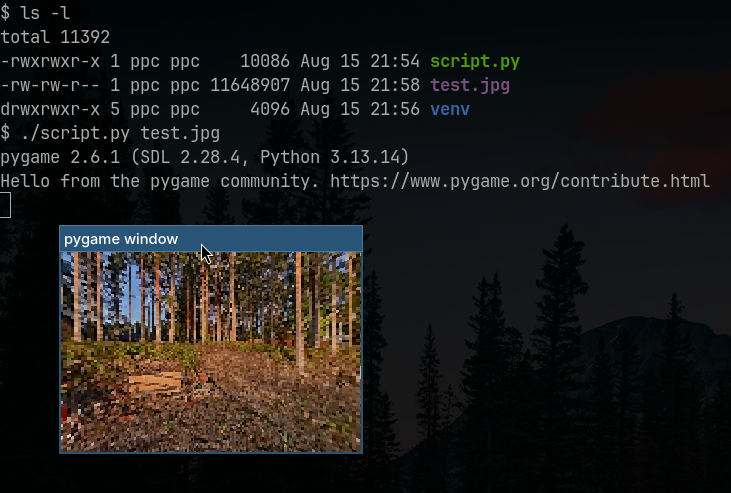
Other than that, it’s a nifty script - and surprisingly quick!
And interestingly, Q and E control the roll. That’s something I’ve never seen in any other panorama viewer.
It runs quickly because I made the window small :)
The direction I picked for the initial view is just what made the math and visualization work out nicer in my head. For me, that was the centre of the equirectangular image. Is there a strong convention for a specific direction?
This diff makes it open bigger (and slower 🙂) and it opens pointing at the center of the equirectangular image, which is conventionally the yaw and pitch origin (i.e. both 0°) if the initial view yaw / pitch / roll XMP tags aren’t set in the image’s metadata:
--- script.py.ORIG	2026-08-15 22:34:05.783171363 +0300
+++ script.py	2026-08-15 23:26:55.552670949 +0300
@@ -142,7 +142,7 @@


 def viewer(image: Image.Image, size: tuple[int, int]):
-    yaw = 0
+    yaw = np.pi
     pitch = 0
     roll = 0
     viewport_dist = 0.5
@@ -228,7 +228,7 @@
     pygame.quit()


-def load_image(file_path: Path, target_width: int = 500) -> Image.Image:
+def load_image(file_path: Path, target_width: int = 2560) -> Image.Image:
     img_full_res = Image.open(file_path)

     width, height = img_full_res.size
@@ -253,7 +253,7 @@

     viewer(
         image = load_image(file_path),
-        size = (300, 200),
+        size = (1280, 720),
     )
For reference, the aforementioned XMP tags that good panorama players should consider to set the initial viewpoint (but few actually do 🙂) are:
GPano:PoseHeadingDegrees
GPano:PosePitchDegrees
GPano:PoseRollDegreesGPano:InitialViewHeadingDegrees
GPano:InitialViewPitchDegrees
GPano:InitialViewRollDegreesMy understanding is that they are redundant, and so few viewers actually use them that I always set them to 0° in all my images and physically reframe the picture so the initial viewpoint is at the center of the equirectangular image and the pitch 0°, as a lowest common denominator, so it’s viewed correctly with most viewers. And in my own repo of 360° material, I set the pitch separately in the HTML file.
Oh, good to know there’s meta-data for this. I’ll look into it.
There is, but it’s not very formalized. The GPano and GSpherical XMP namespaces were introduced by Google - mostly for the Youtube player iirc - and they’ve become the de-facto standard that most cameras respect, and most viewers / players don’t beyond the basic “Is this a spherical media?” tags and the type of projection.
There’s also two EXIF tags:
Spherical
UsePanoramaViewerboth booleans.