- cross-posted to:
- technology@beehaw.org
- cross-posted to:
- technology@beehaw.org
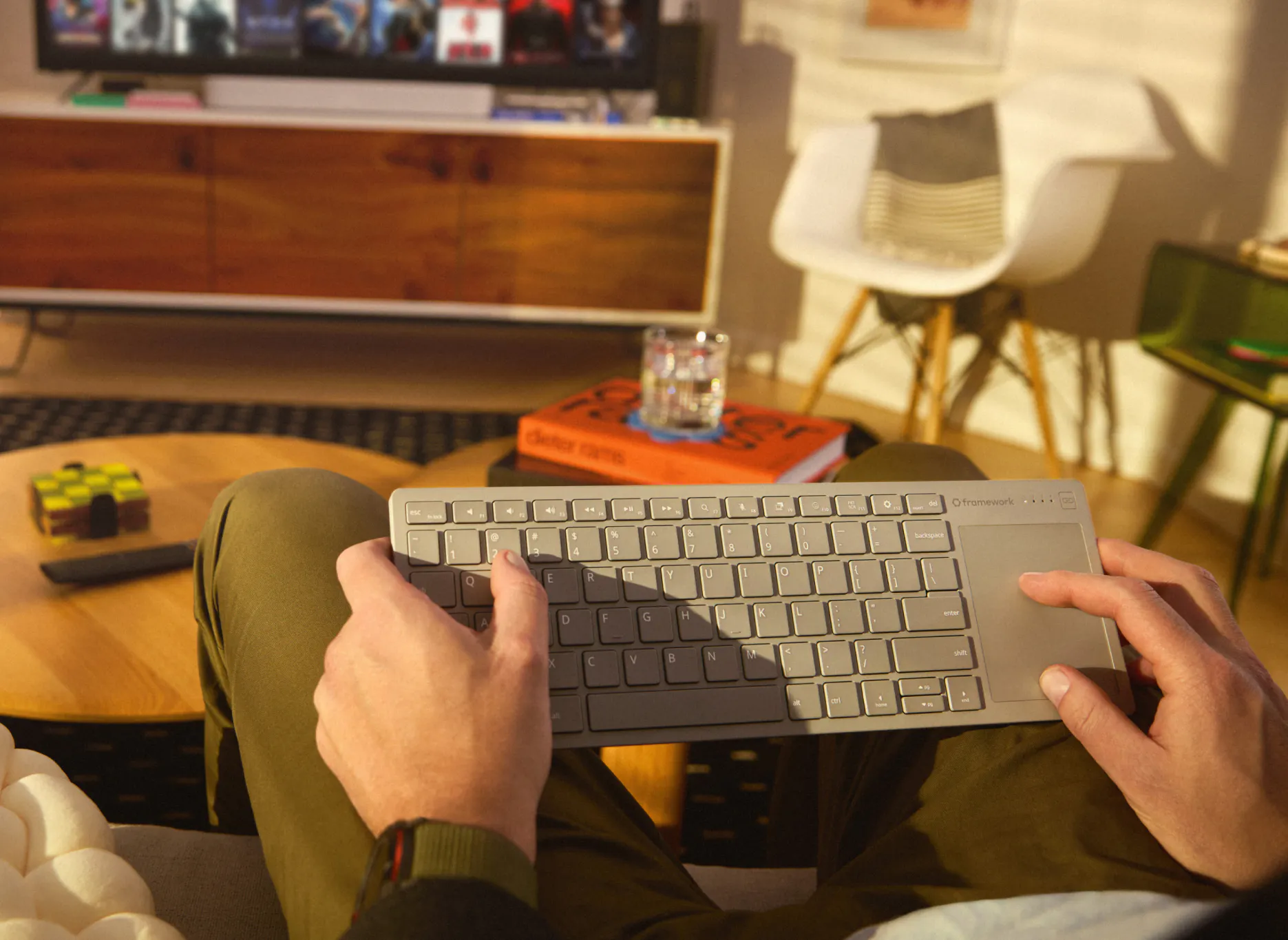
It’s time! Pre-orders are now open for Framework Wireless Touchpad Keyboard! We know a lot of you have been waiting for this (by far the largest email waitlist we’ve had on any product), and we’re excited to get it into your hands. The first batches ship in Q1 2027 in all regions we ship to, and we’re cranking up manufacturing capacity to get as many out as we can in that window.
We wanted an excellent living room keyboard as much as you do, and we’ve spent all year perfecting it. We posted two videos today digging into what we’ve created. The first is a product overview talki through the core features and functionality. The second is a head to head comparison to the product we built this keyboard to replace.
Framework Wireless Touchpad Keyboard is our take on what the ideal integrated keyboard and touchpad should be, for all the scenarios where a traditional keyboard and mouse don’t make sense. The living room is one obvious home for it, and it also makes an excellent setup keyboard for servers, single board computers, and sim rigs. We know many of you want to use it as your primary desk keyboard too.
It’s slim and portable, but dense and rigid with a 0.8mm steel plate inside. It also looks super cool with the translucent black back cover letting you see the internals. To get crisp and tactile typing feel, we used the keyboard module directly from Framework Laptop 12 that we developed with Lite-On. The touchpad uses a Precision Touchpad touch controller from PixArt, the same supplier as for all of our laptops, and runs at 120Hz for smooth, low-latency cursor movement. The connectivity is strong, with an included USB-A Dongle that stores in the back of the keyboard pre-paired on Channel 1, with three additional channels to pair Bluetooth devices. The keyboard has a wired mode over USB-C and supports 8 kHz polling for higher responsiveness too.
All of this means it’s compatible with an extremely wide range of host devices, like Linux and Windows PCs, smartphones and tablets, BIOS menus, game consoles, Steam Machines, Raspberry Pi’s, smart TVs, and more. If you’re a Mac user, we developed what we believe is the best Mac compatibility of any non-Apple keyboard and touchpad. You can hold Fn + O for three seconds to switch any of the channels into Mac Mode (Fn + P for 3 seconds to switch back). We’re emulating not just the keyboard shortcuts, but also most of the MacOS multi-finger touchpad gestures.
We’ve spent the final stretch of our development time optimizing battery life to the fullest. For setup and living room use cases, standby battery life is especially important, since the keyboard may go months between uses, and you want it to work instantly when you next pick it up. In the lowest “on and connected” power state, the keyboard draws under 50 microamps from its 1200 mAh battery. That means it will last for well over a year when used sporadically. It also lasts over a month with hours of use per day at a desk (note: battery life will always vary depending on your usage patterns), and you can recharge easily over USB-C. Since this is a Framework product, it’s designed to last in other ways too. The rechargeable battery is replaceable if you ever manage to wear through the cycle life.
Continuing with our product philosophy, we’ve made large parts of this open for modification and extension. The firmware is an open source fork of ZMK (publishing to GitHub soon), and you can use the broad ecosystem of tools like ZMK Studio to remap keys. The Control Board that powers this keyboard has an ultra-low-power Nordic nRF54LM20A wireless microcontroller and a 0.1” header to enable expansion and re-use. We’re making it available on its own for developers to build their own custom keyboards around. We’ve also released open source surface CAD so you can design and 3D print accessories, like sim rig mounts.
Alongside the keyboard, we designed a USB-A Adapter Expansion Card. This lets you fit the Dongle flush in a Framework Laptop or Desktop. It also works great with many USB-A dongles from other brands. This will be available in the Framework Marketplace early next year. The initial version of Framework Wireless Touchpad Keyboard has a US English ANSI layout. We’d love to hear what other languages you’d like, so please let us know through this survey. We’ve heard from a lot of businesses interested in this keyboard as well. If you’re looking at purchasing larger volumes, you can reach out to our Framework for Business team.
We know that this keyboard will be the first Framework product that many of you own. It’s a simple, useful, long lasting, open keyboard in a category that really needed a better option. We can’t wait to see what you think of it!
We have one other update today. The new 192GB configuration of Framework Desktop starts shipping this month. We opened pre-orders at the end of September and sold through the first batch much more quickly than we expected to. There is a lot of demand for being able to own your AI compute and run much larger models entirely under your control. Pre-orders are still open, with the current batch shipping before the end of the year. We anticipate memory pricing increasing further in 2027, so if you’re looking at Framework Desktop configurations in high memory capacities, you should consider getting in ahead of that.
You must log in or # to comment.
How is this better than a cheap Logitech version?
Build quality, open/customizable firmware, improved touchpad, etc. Just about everything about it other than
- the price
- the lack of a dedicated mouse button on the left side
- a custom battery pack instead of using a standard AA or AAA or whatever battery
On the one hand, it’s a really cool keyboard idea.
On the other hand it’s $150 for a keyboard, which you can get the Logitech equivalent for $50
The extra $50 is a deposit. The total price is only $99, you just have to pay $50 upfront to pre-order it so they can estimate actual demand.
That comment is probably not talking USD. In other countries, the price is truly $150+.