- cross-posted to:
- lemmyshitpost@lemmy.world
- cross-posted to:
- lemmyshitpost@lemmy.world
cross-posted from: https://quokk.au/c/lemmyshitpost/p/887837/photoshop
You must log in or # to comment.
Jokes on you, I always used ms paint.
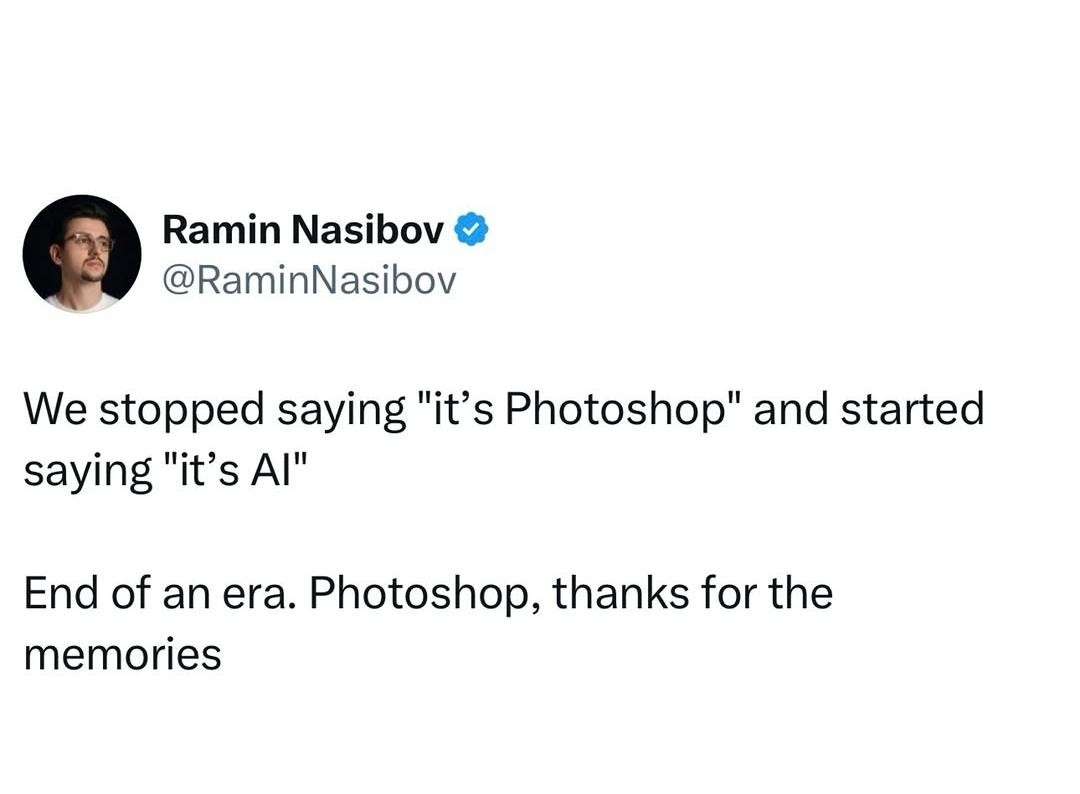
I keep seeing people say “this is AI” about images and video that are extremely obviously photoshops and other “manual” edits. And that’s fucking scary, IMO.
How are they so unable to differentiate a shitty edit from AI? It’s completely different. No AI image or video I’ve ever seen has looked like a bad photoshop, CGI etc. The way AI stuff looks has a different thing to it, even really bad AI. And I fucking hate AI of all kinds, just to be clear.How are they so unable to differentiate a shitty edit from AI?
It’s just that most people don’t know what you mean when you say something is “AI generated”. With context clues, they tie back to terms they’re already familiar with, and are associated with fake computer generated imagery (“that’s Photoshopped”).
I think most people have never even seen Adobe Photoshop, the actual software. Like, literally never laid their eyes on the gray window, the layers and tool panels, etc, yet they’ve still thrown the term “photoshopped” around.
Is it that they can’t differentiate them or that they don’t care to? For instance; I play online RPGs, most people make tons of art for their characters, businesses, etc. majority of the time it is AI slop but sometimes it’s just shit edits…I don’t care for either so I’ll just dismiss anything with shit filters or unnatural construction/orientation as AI slop and move on because it saves time and brain space…oh fuck I’m turning into Dr Cox in my old age…
Most people can’t tell the difference between the two, probably because they don’t know how either of them works. And just like others have said, it’s the same thing with CGI. I was watching Avatar 2 the other day and one of my friends said something about the graphics like “oh, that’s probably AI”, and I angrily replied “do you have any idea of how many dozens, if not hundreds of people painstakingly worked on this movie’s CGI??”
Don’t think that’s what’s happening.
I suspect it’s similar to my coworkers who refer to everything that uses any kind of networking as “Wi-Fi.”
The other day I watched a movie at the theaters and when a very obviously CGI animal showed up on screen I heard people going “It’s AI”.
So yeah I agree, people just use the names they’re used to I suppose
We could start a new quiz genre of “shop or slop?”
Not quite the game you want: https://realitycheckk.com/25
“Welcome to the hit new game show ¿Shop or Slop?!!”
I wonder if Photoshop will finally become affordable in response.
Nah, they’ll add AI features and charge you double per month (if that didn’t already happen. Sometimes I confuse the timeline)
Not sure about the licensing, but Adobe’s AI is called Firefly and it’s a few years old now.
looks over from still making shitty memes in GIMP
“Huh?”
I made my most recent meme in kolourpaint
For Android I highly recommend Pocket Paint from FDroid.
That looks real useful. One major thing I cannot figure out is how to add an outline to text. I can add text onto an image and change the color/font/size of that text, but I cannot find a way to outline that text. Which is pretty important most of the time I want to add text on an image.
How I do it: Make text, create a new background layer, make the same text but slightly bigger in the colour you want your outline to be, align background text as needed. Save as .png and import into new image if you’re looking to add the outlined text to somewhere else (though I suppose you can just merge layers, I do my crap in fits and spurts so I often prefer having the little pieces as discrete files so it’s easier to come back to it. Also I’ve fucked up and merged when I probably shouldn’t have a LOT).
Takes some futzing about for sure but that’s part of the fun for me.
Edit: Super shitty outline done just by doing the same font size bolded in black. Can obviously be done much better but you’ll get the idea.

I haven’t found a way to directly add an outline frame to the text but you can go to tools->shapes and set it to outline no fill and manually do frame the text
thanks for the recommendation, i have been looking for something just like that
Thanks, installed
The interface is a bit strange at first but it is a genuine multiple layer image editor it is great.
A tip, make sure to confirm/complete a tool’s action before you switch to a different one, it is easy to switch off a tool while it is still “previewing” something.
I’m still using mspaint
Im on linux btw, so I can’t do that anymore Dave.
Would it run in wine?
IDK, I have Kolour paint, it’s kooler bekause KDE never left the K90s
Not the shitty win11 one.
As long as there’s a pepper in there
I could afford to call it photoshopped when it was a one-time fee. When they changed to a subscription model, I had to switch to piracy.
I just stopped using it alltogether. I stopped being creative. That’s so fucked, lol. They killed my creativity.
Now I channel my energy to hating society.
gimp or krita or inkscape it up
Is Paint Shop Pro still a thing?
I still use it!
Gimp I’ve tried a lot, but didn’t get how it worked. Now using Krita (new pc and can’t be bothered to download cracked ps), and it kind of works like pre CS1 photoshop. Probably it works a lot better, but I’m set in my ways.
Krita and Inkscape are great. Gimp not so much, but im used to it

Not really, because AI is taking their jobs away
There is a difference though and one didn’t go away just because the other exists.
Yeah, I think we may keep photoshopped in the vernacular to describe real photos that have been edited.
There is a big difference between edited and completely fabricated.
And ‘edited’ in PS with AI is still AI
They actually work in tandem now. And honestly, some of the generative stuff in Adobe products I find genuinely useful. Specifically I really like the AI noise reduction in Lightroom. It allows people with less-expensive cameras to have better end results.
Photoshop the software is named after photoshopping and not the other way around.
Can you clarify what you mean? This is the kind of trivia I’d normally know about but I fail to make a connection, a quick search also didn’t yield more info besides that it was supposedly whispered to the creators by a potential publisher, and the obvious reference to a “shop” for photos like a workshop.
A photo shop is what you used to take your film or pictures to to be enlarged or touched up. This process became known as photo-shopping and the software was named after this. This is according to my artist grandma who died recently and my graphic design professor years ago.
It’s not true. It was called photo manipulation before Photoshop.
Adobe has actually complained about the term photoshopping because it can lead to genericization and loss of their trademark.
That’s absolutely not true.
Edit: Okay, eat shit downvoters. Please provide a source that confirms the term photoshop was used before 1992.
Does it work similar to the noise reduction on flagship phones? Then it does create a feel of artificialness when looking closer, with a tendency for artifacts.
Maybe we should just use ‘Photoslop’ and combine the two.
Hey now, pumping out memes in Photoshop is an art form that takes real human effort!
ai, like the programmer humor com avatar! choices.
And it was a very rapid shift as well. Barely saw it pass over.