wow… OS Subcription-Based with AI?
you’ll own nothing, and you’ll be happy
I’m glad I already moved to Linux for 2 years
Subscription-based. AI-focused.
Lol. No thanks.
You’ll be hounded relentlessly to upgrade until you give up and pay the monthly usage fee
Or switch to Linux
It’s so fucking nice, in nearly all aspects
I’ve been off Windows since 2006, when I switched to Apple. I’ve been off Apple since last year, when I switched to Linux (Ubuntu first, then Mint). It really really rules.
I used my wife’s Win11 computer recently for some fairly simple tasks (one was converting a Word document to PDF and emailing it to her). It was a borderline nightmare. Using the search field in the Documents folder sent me to the web, Word froze because “Microsoft365 and Office need to update.” Then I get a notice that there’s a BIOS update and it would only let me dismiss the window for “120 seconds.” Add to that that, graphically, it looks like garbage and the whole thing makes me bewildered that this is what passes for the global “standard” of desktop OSes. I feel sorry for people who have to use it.
I’m amazed companies tolerate this bloat. I’ve worked at a place where I still had built in Xbox shit popping up all over my desktop while the CEO was standing at my desk talking to me. :-D
Going home and logging into a “clean” computer is a breath of fresh air.
Nah, I’m not the target audience. Switched to Linux over a decade ago with no regrets. Windows is essentially malware now.
they are hoping businesses will be forced to buy the AI slop machines.
If you’re a loser.
Yeah, you don’t get to say no thanks. Your boss will still buy Windows 12. The corporate world will still steal your soul. The world of politics will still be corrupt. And Tupac Shakur will still continue to be the CEO of Burger King.
My boss is actually actively pushing macs for new employees and to replace old windows laptops.
Wouldn’t it be great if they didn’t see a price tag as a sign of quality and went with Linux instead? What a great world that’d be…
The It department told me the reason that they don’t support Linux is the lack of good endpoint management software and the support overhead compared to MacOs
Most endpoint management software supports Linux as well as they do Macs these days (probably better, because Apple keeps locking management agents out of settings). These days, the problem is more one of talent and marketing. You have to have people who actually know enough to successfully manage them, and also the upper brass love to be sold to. It’s all getting there though. I wish more governments would take the plunge, that would help the talent issue at least.
They know it exists, they are just very understaffed so don’t have time getting more complex things set up.
At least the devs get to have Linux if they can fix their own problems, but no more new non Mac Hardware…
I honestly doubt that’s true. I’m sure there aren’t any with the same marketing budget, but I’d bet they exist and work just as well.
If it doesn’t exist, it would if companies started moving to Linux.
Lack of endpoint management software
Then fucking make one?? Software development is part of the IT, no?
I’m not sure if you’re being serious, but software engineering and IT systems administration are different roles typically filled by different people.
A company or organization can have a quite sophisticated IT department without having any software engineers on staff.
I don’t care at work because I’m not paying for it or doing anything involving my personal data or any power user stuff. Windows barely matters there. Everything has moved into web apps and websites.
I use 10 for my gaming/media PC.
I’ll use 11 if I have to when using some public computer or something.
But I absolutely, categorically, refuse to even touch a ‘subscription-based, AI-focused’ OS, ever, for any reason.
🤢
Just it being Windows, no matter those things, should be enough for everyone to go “Lol. No thanks.” But sadly that isn’t and won’t be the case. Hundreds of millions of people will just go along with it, even the idea of something else existing will never occur for them and Microsoft knows this. All the hate and outrage about how evil they are and how Windows has gone to (from like Windows 95) absolute shit has only made a very small portion of their possible userbase switch to or even ignited the idea of finding out about something else. I think the only way Microsoft will loose enough “customers” is if it just dies, nothing else will make the average person lift a single finger or have a neuron activate for making the leap.
Sounds like a huge sack of shit
🌎👨🚀🔫👨🚀
Excellent. Finally the cycle of alternating good and bad versions of Windows will be broken. It’ll just be bad versions from here on out.
Not only that, but increasingly worse versions, apparently.
I’d argue Vista was way better than people gave it credit for.
Vista was better than people give it credit for simply because we now have 8 and 11 to compare it to. Vista sucked but it wasn’t intentionally hostile towards the user like new versions of Windows are
Vista only really sucked if it was installed on an old PC or one of those cheap “Vista capable” machines that only had 512MB RAM.
Vista was overall “ok” when paired with hardware that could actually run it. Biggest perk was that for a small window of time, it was the only OS that had DX10 support outside of community patches to emulate DX10 in XP & 2K
UAC was implemented in an extremely overbearing way that trained users to ignore any critical system pop-ups.
Aside from that, many of the core systems were unoptimized, and when added on that many hardware partners under spec’d the entry level machines that were being sold with it, the OS performed far worse than it’s predecessors.
Finally, an OS for me! My biggest complaint since the days of Windows 95 has been the lack of being able to add new features. I didn’t really care what they are, but I just like the process of subscribing to additional features until I can max them all out.
And secondly, my next biggest gripe has been how hard it is to find AI. It’s never at my fingertips. Now that it’ll be integrated into the OS itself, I can finally use AI for everything! And if I can buy new hardware annually to allow me to resubscribe to all the latest features, while telling AI my shipping habits, I think it’ll be perfect!
I can’t wait to give Bill Gates money for this! I know he’ll spend it on a good cause. Maybe two young Russian good causes! He’s such a cool guy and not at all a billionaire creepo, thank goodness!
[insert “Had me in the first half” image macro here]
I know he’ll spend it on a good cause.
Antibiotics, for those times when he cares enough to give the gift that keeps on giving
I can’t wait to give my credit card information to my AI agent so it can buy more features for me without me monitoring it!
Imagine waking up to a fully decked out Windows 12 plus pro 365 hell yeah 730 Copilot ?
Which entry-level Linux distribution do you recommend?
Linux Mint, for sure.
Mint, or possibly bazzite if you’re a gamer, because that’s the Linux distro Gamers Nexus picked to test performance on.
Or, valves steam os should have a fleshed out PC version very soon.
Steam os isn’t that great as a daily driver IMO. It’s really more focused on the gaming part, and tbh, mint + steam autostart in big picture mode is better at its job.
Might just be my preferences.
Like I said, valve hasn’t released the PC version of steam OS, yet. So that makes it kind of hard to criticize. Using it on my steam deck seems like it would be just fine as a simple Linux desktop. It all navigates and works. There’s just nothing flashy about it. Dunno what all you do with your desktop. I just need mine to navigate around and run programs.
Bazzite is great as well! Though I will admit I have had trouble installing it on old hardware. A few ddr3 systems with 2.5" ssds, mostly. It works wonderfully on anything from the past 5 to 10 years though.
And you wouldn’t think there were that many ddr3 systems around anymore. But there are surprisingly quite a few. Intels 4790k is still pretty useful even today, and you can get 16 - 32gb of ram in these old systems. For those who just want to play decent games from 10 - 15 years ago, or lightweight indie titles like stardew valley or factorio, a cheap ddr3 build is perfectly fine. Especially given the prices of modern hardware. For those systems, CachyOS has always worked.
However. Mint installs on just about anything. I’ve even installed it on a Dell Optiplex 780 from 2011! It’s so little fuss to install and use so I always recommend it to new users.
I’d recommend CachyOS over SteamOS on non-valve hardware. As much as I love SteamOS on my Deck, it’s highly tailored to the hardware, and has some limitations. But that comes with caveats I’ll cover later.
I also find Bazzite to be too locked in, and complicates how to do things that aren’t managed, for a general gaming desktop. If it’s a media center PC Bazzite can be great, but can easily feel locked in if you want to start adding TV apps or Kodi.
That said, for a beginner friendly Linux distro I’d point most users towards Mint or Pop!_OS depending on their use case. If the user has a high technical knowledge and capability, but lacks Linux experience, I’d point them towards CachyOS, their docs, and the Arch Wiki. Maybe Garuda if they want to additional bundling and update management tooling.
Your points are all true right now, but I imagine that when Valve actually releases the Steam OS distro for PC there will be a large shift to people using the distro and lots of user support and searches will follow; much like how it’s easy to find help when doing anything on steam deck is, just from the size of the user base. A lot of people are going to move to it.
If you’ve got a geeky power user strain in you, try Pop_OS! with their new COSMIC desktop. The blend of traditional window manager and tiling is an absolute delight. But if you’re just trying to stay in your comfort zone as you explore the unfamiliar waters of Linux, I heartily recommend Linux Mint.
I’ve installed Mint on my own gaming desktop, and it’s invariably what I install for customers who can’t afford a PC upgrade to deal with Microslop’s Windows 11 bullshit. They all do fine on it, no one even appreciates the difference from Windows except that they all recognize their old hardware is suddenly much snappier than it was. And as for Pop_OS! COSMIC, I’m running that on the laptop from which I’m typing this comment now. I like them both, but Linux Mint is definitely more battle-tested.
Ubuntu’s GNOME layout isn’t really for me, but if you’re looking for something that’s…I don’t know, a little Mac-ier than Windows-y, then Ubuntu isn’t a bad way to go. I tried Kubuntu (that’s Ubuntu with KDE instead of GNOME) recently and I had a lot of trouble with it for some reason so I just fell back on Linux Mint (which is how it became my desktop computer’s OS).
Don’t over-think it. The joy of live ISOs is that you can put them on USB disks and try various interfaces out. At the end of the day though, it’s like human DNA…99% the same product under the hood, and you can typically change things around after the fact.
Actually, I have a good example of that: I put Linux Mint XFCE on my grandma’s machine because it was especially under-powered. XFCE is just about the lightestweight traditional desktop environment around. I was worried Linux Mint’s typical Cinnamon environment might be a little heavier and therefore leaving some performance on the table. Well, I spent hours trying to troubleshoot why I couldn’t use RustDesk to remotely connect to her computer for support, and it finally occurred to me that XFCE might be the problem. I didn’t have to reinstall the entire OS! I just installed the Cinnamon package (one single line of a command in the terminal), then I logged out, chose Cinnamon on the login screen, logged back in under this different desktop environment, and was able to use RustDesk successfully! No fuss, no muss. I’m not going to say you won’t have occasional headaches with Linux but you tell me what comparable options I have when Windows 11’s heavy fucker of an interface with a taskbar I can’t move around the screen is ruining my day, or macOS replaces a tried and true GUI aesthetic with a batshit broken liquid glass one? I certainly can’t swap in the older GUIs I liked, but in Linux, it’s totally an option, like changing the exhaust on a car or whatever.
Have fun :)
Fedora
You can give it a test drive, given peoples suggestions. The most common desktop environment are Gnome and KDE, and I think they tend to have the least issues with stability, screen tearing, scaling, and fps, since they’re the most actively developed.
I just started using Linux, but Bazzite has been treating me well. If you are primarily using your PC for gaming, that might be the way to go.
They also recently got their team reinforced, so I am hoping that carries them much farther in the future. https://www.xda-developers.com/bazzite-reveals-the-open-gaming-collective-to-make-gaming-on-linux-even-better/
- If you want something that never changes, Mint.
- if your main use is gaming: Bazzite
- For any other use case, Bluefin or Aurora (Bluefin for rounded corners, Aurora otherwise).
Nobody is asking you what hardware you’re running or your use case…
If your computer is a couple years old and you’re doing general web browsing, then I would recommend Kubuntu 24.04, latest version of Linux Mint, or Debian.
If your computer is newer, as in a year old or so, I would recommend Kubuntu 25.10, latest version of Fedora(KDE/Plasma spin), or possibly CachyOS(Arch based).
If you’re a gamer, then same as above, Kubuntu 25.10, Fedora, or CachyOS, but I would highly recommend CachyOS in this instance.
The main things to consider for Linux is the version of the Kernel you may need and what Desktop Environment(Gnome, Plasma, Cinnamon, etc) you prefer.
The Linux Kernel is where most drivers will come from and are baked in. You can install proprietary drivers, but that process can vary depending on the distro.
The Desktop Environment is what you’ll be interacting with on a daily basis. Personally I prefer and highly recommend Plasma. It has great Wayland support(newer way to render and manage programs graphically) and customization is there if you need it. You CAN install multiple Desktop Environments at the same time and you’re not stuck with whatever is the default. But again, I’d recommend Plasma.
Now, why CachyOS? Simply because it has a lot of quality of life aspects available. It’s not a “gaming” distro, but it can be right out of the box. It’s built for speed, but also convenience in my opinion. Cachy can automatically detect and install the latest Nvidia drivers during the initial install. The “gaming” packages are a single click in their “CachyOS Hello” window on startup. And if you choose GRUB or Limine for your bootloader and BTRFS for your filesystem, you’ll have snapshots for recovery automatically setup for you(which saved my butt twice now).
Definitely try out a few distros. Personally I started with Mint and loved it, but I ran into driver issues eventually due to how they do kernel releases. Then tried Ubuntu, Fedora, Manjaro, Endeavor, Debian…all of these never “kept” me because of something breaking or lack of timely driver updates. But I’m on CachyOS now and within a month of trying it I ended up switching all of my Windows machines to it, which I’ve never done before. I’ve never gone “full Linux” before, but Cachy pulled me right in. I’ve thrown it on multiple laptops, a NUC, and a desktop gaming PC and it’s “just worked” on all of them.
IMO, Arch (which CachyOS is based on) is decidedly not an entry-level distro. Might be the smaller evil if you’re doing lots of gaming, though.
I totally understand and I do hate recommending Arch right from the start, but CachyOS is a great entry level Arch distro. The installer is pretty straight forward and setup is very minimal if you’re just going to game. The only thing lacking IMO, for beginners, is an “app store” with pretty pictures.
But if you’re gaming, I think you should be on the latest kernel possible, so a rolling release(Fedora) or bleeding edge(Arch). Latest Ubuntu derivative(25.10, soon 26.04) is fine but not ideal. It’s the main reason SteamOS is also based on Arch.
Again, not gaming? Mint is probably the defacto unless you’re on newer hardware.
I think if someone is a power user of Windows already then they can adapt to CachyOS as a new user. I’d recommend it to those people because I was that guy lol. The difficulty is…updating! Not using the OS. What does that mean actually for new people looking in?
You read:
https://discuss.cachyos.org/c/announcements/5
Before updating. Every time. Which you do pretty often. That’s the point of rolling release. Sometimes you have to manually intervene, usually updating is uneventful. Let’s look at CachyOS January 2026 announcement for an example of eventful:
CachyOS says:
Manual changes for existing users:
KDE Plasma users with SDDM can now migrate to Plasma-Login-Manager. Please run:
sudo pacman -Syu plasma-login-manager
sudo systemctl disable sddm
sudo systemctl enable plasmalogin
sudo pacman -R sddm-kcm cachyos-themes-sddm sddm
outside of this the usual:
sudo pacman -SyuWhat else is difficult? .pacnew files. What are those? Config file changes, basically. Pacman the package manager doesn’t deal with config files. You have your old file and the .pacnew file. You manually merge them. Install meld, it highlights the differences and provides arrows to move the changes easily into your existing config file of whatever got updated. How often? Not very. I’ve done it…under 15 times in a full year I think?
Now, I think a Windows power user can handle this. Someone scared of folder structures and doesn’t read error messages? No.
I have been running CachyOS for 3 months now.
I have never, not once, looked at those announcement links.
And I just click on the fancy icon in my taskbar that runs pacman -Syu for me.
I’ll have to look at .pacnew, but again, I think you’re making this way bigger of an issue than it really is, these are pretty simple things to do and learn compared to other Linux bullshit I’ve had to deal with in the past.
Also, talking about updates, I remember an update in October? for two of my Windows PCs at the time that bricked Windows Update. The solution? Reinstall windows. So I installed Cachy instead.
*Edit, and I just looked at sddm/plasma, the latest plasma updates auto disabled sddm for me and enabled plasmalogin. So, not sure why it was a suggested manual change?
I was explaining what’s so “difficult” about running rolling release and best practice because I don’t think it’s all that difficult…😅 but nobody usually explains what people even mean by that. Unknown scary!!
If you want to ignore arch news…that’s up to you I don’t care. Long term things do go wrong now and then. Not that it’s a big deal with snapshots.
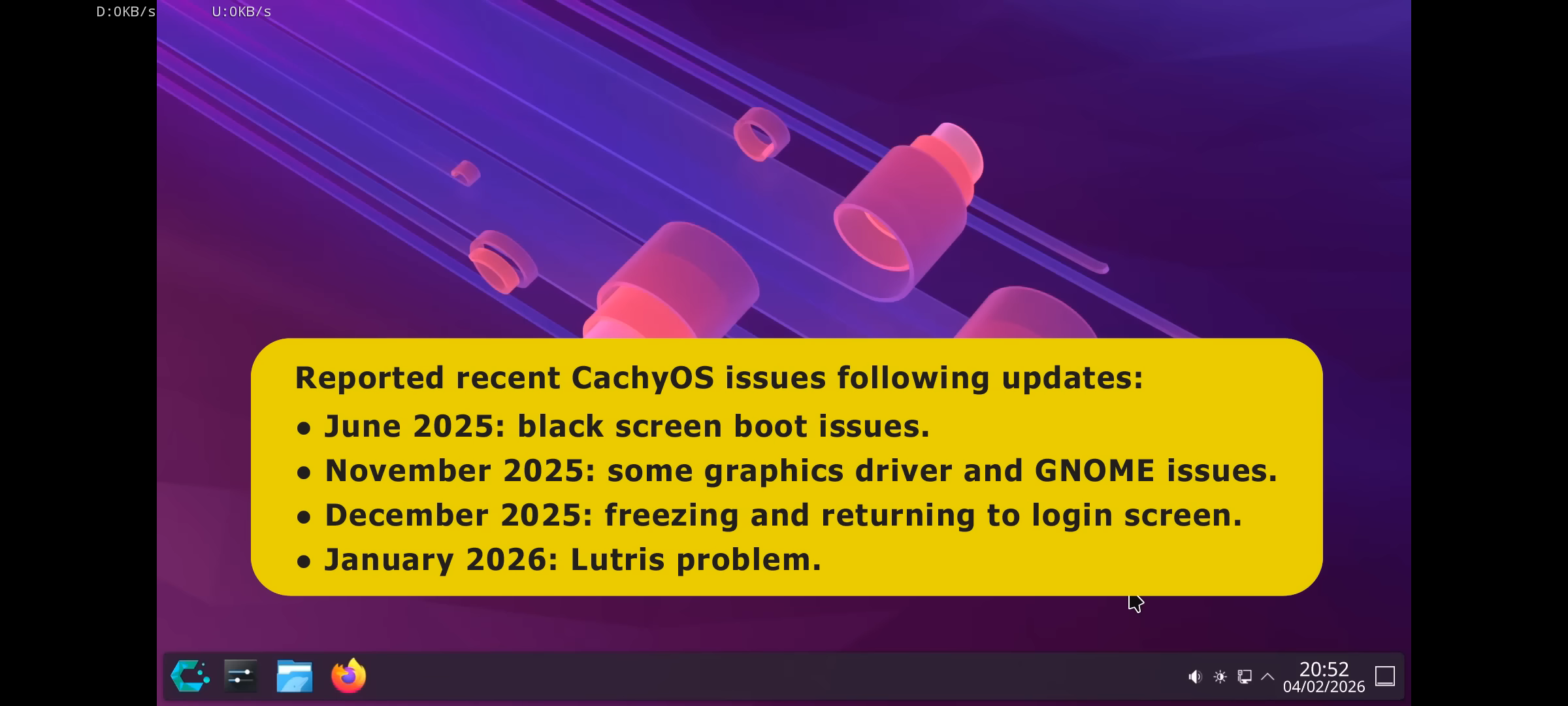
It’s pretty much exclusively about the update process for me. With fixed-release distros, you typically only have to actually pay attention, read news posts etc. before updating to a new major version, which in case of Ubuntu LTS happens every 2 years, which is a lot fewer opportunities to fuck up than Arch’s rolling release. Not insurmountable if you’re something of a power user or willing to put in the work to learn, but hardly the first choice for someone asking for an entry-level distro.
But if you’re gaming, I think you should be on the latest kernel possible, so a rolling release(Fedora) or bleeding edge(Arch). Latest Ubuntu derivative(25.10, soon 26.04) is fine but not ideal. It’s the main reason SteamOS is also based on Arch.
Ubuntu’s HWE kernel is just fine, even for LTS users. The only time it might not be enough is if you buy bleeding edge hardware. IME, the actual issue with Ubuntu for gaming is that sometimes you’ll need newer mesa packages, which needs to be acquired separately from the kernel, usually via PPA. If you’re playing newly-released AAA games, that does come up occasionally. e.g. I started using a mesa PPA when I got Elden Ring. Though I’m not sure if even that is necessary if you use the 6-monthly Ubuntu releases.
So yeah, if you’re that kind of gamer, Arch probably is a cleaner or at least equivalent solution than Ubuntu.
If you don’t need lots of up-to-date gaming support, Mint. The newest games and hardware are more likely to have issues than older. If you’re looking for something approachable and built specifically for gaming, Bazzite. If Bazzite is a bit too strong on the gamer feel and you want something a bit more toned down, I personally use EndeavourOS.
Ubuntu or anything Ubuntu-based should be smooth sailing. e.g. Linux Mint treated me well when I switched from Windows 7, and I’m still using a heavily modified Ubuntu to this day.
Ubuntu is definitely the best entry-level user-friendly Linux distro to start with, the latest installation process is so simple.
ZorinOS seems like a decent choice.
Mint and some Ubuntu flavor such as Kubuntu. These two have the biggest userbase and thus problemsolving via internet search aswell as lots of deb packets come in handy.
Also they are out of the box experience straight from the start and everything just works.
Mint.
deleted by creator
As others have already recommended, Linux Mint. Although I had trouble getting my two monitor set up to work, I couldn’t set the Scale for each monitor individually). Or Bazzite, which worked right out of the box for me
I am entry level and mint is so far being nice with me, just that my pc is old so it kinda lags
When I started 3 years ago I was distrohopping almost every week… For gaming on Nvidia+Intel combo - arch Linux distros with kde is where I found peace… Started with endeavouros and now I use cachyos with kde plasma. Both are quite good. I have installed limine+ Snapper and this does system snapshot on each update. Never needed it though and every time I am updating irresponsibly. Gl, install any Linux.
Ubuntu based for sure like Linux Mint, ZorinOS or PopOS
but I wouldn’t recomnend Ubuntu for their Snap
I’m not a fan of snap, either, but is it actually an issue for entry-level users?
For the distribution (distro), Ubuntu. There’s a chance that you experienced this distro growing up at your school or local library.
For the desktop environment (DE), GNOME is most like Apple OSes, while Cinnamon and KDE Plasma are most like Windows 10.
Cinnamon tends to go better with the Mint distro though, and GNOME is the default DE for Ubuntu. I use KDE Plasma with Ubuntu (Kubuntu) personally and I’ve enjoyed it.
PopOS
No!
PopOS switched to Cosmic which only just came out.
Recommend PopOS to users with experience, who know how to fix/avoid problems.
But, hold off from recommending PopOS for beginners until around the 27.10 release when most of the papercuts are sanded over.
Something modern and immutable (so its harder to break) like KDE-Linux. Otherwise, something like Bazzite which is good for gaming. If you want low resource and flatpak (its the future) built in, ZorinOS.
So when they said “windows 10 will be the last windows”, they were kinda right. Just not the way the imagined…
I don’t wanna sound like someone defending Microsoft, but that line was taken out of context. It was originally something like “last one you’ll buy” meaning they’re giving free upgrades now to future OSes.
…but then again, even under that meaning this is pretty shitty. Most people would rather buy something than have to rent it forever. Especially when the norm is already that they own it. Doubly so when that price is already hidden and baked into the price of the hardware the user is buying. Most folks probably aren’t even aware they’re “paying” for Windows in some form when they buy a laptop.
(Yes yes nobody owns Windows, they own a license to use it blah blah blah.)
It’s sort of funny to me, that original Windows 10 “last OS” thing came from around the time Jetbrains tried to push a subscription model over a purchase model. They ended up going with subscription with a perpetual fall back license which seems to be the best of both. (Once you pay for 12 continuous months, whatever version you had at the start of the 12 months you get a perpetual license for. So if you stop paying the subscription after 15 months, whatever version existed 12 months ago you can use forever.) I can’t really see Microsoft doing that though.
I remember in early 2024 when I switched to Mint I got some mild pushback from acquaintances, saying in so many words that I was overreacting to Windows getting shittier and that “you can just strip all that bullshit out/you can make a local account/etc.” (while at the same time telling me “linux is too hard/painful because of all the stuff you have to do to make it work right/doesn’t have xyz program”).
I have been getting ever more smug and feeling more vindicated about this decision every day for the past two years.
It’s like complaining about requiring the command line but willing to mess with regedit, group policies or even powershell to just get Windows to a temporarily usable state (before an update overrides your settings).
That was the breaking point for me, actually, back in February 2024; when I realized I was going to have to tard-wrangle my operating system to get it to behave right no matter which OS I used, I’d rather use the one that’s free, doesn’t include spyware I have to rip out, and won’t re-fuck itself after an update. Like, yeah, the terminal is still a pain in the ass for me on rare occasions I have to use it, but it’s no bigger a pain than any of that stuff on Windows; nor is it inherently any scarier than Command Prompt or PowerShell like some seem to think; and unlike Windows things actually stay fixed instead of some corporation going “ah-ah-ah, you can’t do that, let me just fuck that right back up for you.”
Like, I was prepared for the same kind of fight with Linux I’d had with Windows because the fight didn’t seem all that different by that point; that Mint ended up just working most of the time was an unexpected delight.
I have been getting ever more smug and feeling more vindicated about this decision every day for the past two years.
This is so true. I’m at about twenty years since I switched and Microsoft has done nothing but validate my decision over and over and over since then. I sincerely feel bad for people who still use Windows.
Windows 12? Well, I’m using Debian 13. 13 is a bigger number than 12; therefore, Debian is better than Windows.
For all the people on here quick to mock others for being gullible enough to fall for AI-generated slop, this is embarrassing.
Let me guess? The AI usage is going to stick its hand in your pocket for usage credits. Remembering that AI is currently massively unprofitable, at some point they’re going to try to make money off it. Ironically I don’t think they’ve considered that any supposed savings they make in getting rid of employees will get eaten up in energy and compute costs by AI companies. The business case for this has never made any sense.
AI is currently massively unprofitable, at some point they’re going to try to make money off it.
They need to make people dependent upon it first, then do the rug pull, and the dependent people will have no choice but to pay.
They’re still stuck on that first step, though. Very few people are adopting it to a level where they’ll depend on it. Even the ones who do mess around with it are mostly just doing so casually and wouldn’t really miss it if it went away.
isnt thats why they are peddling it to governments, and LARGE BUSINESSES.
The best case for their rug pull would be artificial boyfriends and girlfriends, but there’s not enough money there.
Nah, the best case for the rug pull will be all the software developers – especially less experienced ones – who have grown accustomed to using it and forgotten how to do their job without it … if they ever knew in the first place.
Some telecom companies are starting to embed AI subscriptions in regular internet+TV service contracts
Subscriptions never get cheaper over time.
Yay! More Linux users!
Nah, most people are basically NPCs lacking critical thinking and just do and consume whatever their corpo overlords want them to do lol. I mean just look at the amount of people who continue to have dozens of streaming subscriptions although those get worse and expensive by the year. Same with people who every year purchase the new iPhone for 2k dollars or whatever and then only use it for WhatsApp and Instagram and stuff lol.
Agreed, but I’m pretty sure this will still result in a bit more Linux users, even if not all. Baby steps.
Ugh. I’ve never wanted to use Linux and can’t afford a Mac, but with this situation, Linux is all I have left. Which I do find annoying but I just can’t keep justifying using Windows.
Pick a popular distro and live boot it to play around. No commitment necessary and you might find that it’s fine for your needs (YMMV of course).
I use Fedora professionally and Ubuntu at home, they are both far more respectful of your time and ownership than windows had been for years.
Microsoft isn’t going to move any way other than in a user-/owner-hostile direction any time soon.
It’s a super rewarding experience, it’s a breath of fresh air after windows forcing shit on you 24/7. Nowadays for a somewhat advanced user it’s a really easy switch, unless you are locked into specific software.
deleted by creator
Whatever live Linux distro you test, make sure to start with one that has a desktop environment called “Xfce”, “Cinnamon”, and/or “KDE”.
Other desktop environments (the user interface) like “GNOME” are kind of Mac/Win8-like, which some Windows users dislike.
Warning: after using Linux for a while you’re likely to not put up with crap anymore, causing you to jump to another Linux distro if your current distro does anything stupid. When Ubuntu started using GNOME3, I jumped to Xubuntu. When Xubuntu started with the Snap-nonsense, I jumped to Mint+Xfce.
The problem is that I’ve been coding on Windows (and occasionally) Mac for the good part of 8 years and I’ve just become used to the bullshit here. I really hate the idea of having to get used to a completely new brand of bullshit. And I don’t mean corporate bullshit but rather OS jank.
But yeah, thanks for the suggestions. I think I’ll start figuring out some way to migrate all of my stuff. And the C++ legacy libraries and other more complex things.
deleted by creator
Microsoft can subscribe to deez nuts.
Um, asking for a friend… How much do your nut subscriptions cost?
Mine are free, but you have to be skilled enough to take a knot in your muzzle regularly
FUKKIN GOTTEMMMMMMM DAB. ON. IT.
“Fully modular” as 'It can run on a toaster" or as “For access to the file manager, subscribe to premium”?
Full functionality is said to require a dedicated NPU with at least 40 TOPS of computing power.
Because hardware is getting cheaper by the day, especially RAM and SSDs, so I should be happy I get to rent a reviled, unwanted, AI-crammed OS from Microslop to put on my not-at-all expensive new machine I have to buy just to run it, that will package all my data up and send it home on the regular, via bandwidth I also pay for, to use it to train their AI for free, along with every other byte of private data they’re stealing around the world as fast as they can get their hands on it. But wait, I’m not happy enough! Because then Microslop also gets to sell that same private, personally-generated data along with geolocation and wifi triangulation and every other privacy-obliterating feature they can cram in with it to advertisers for ad targeting wherever I go, as well as to my own hostile government as surveillance should I happen to be brown, not cis-het, and/or suspected of engaging in thoughtcrime. AND there’s even a bonus! My subscription fees, as well as my data sold every which way they can flog it to others of the Epstein class, will very likely fund Microslop’s direct involvement in genocide, just as it has done in Gaza and elsewhere. Win/win all around!
Yeah, no. Shitty company, shitty product, enshittifying the world one PC at a time. Fuck that.
Not only do you get to pay for the hardware to be able to use the software, and then pay for the software to be allowed to use it. When you use the software it siphons various user data off of you to train their AI with, so that you, the valued customer, can also pay for that AI service.